How to Find Songs in a DJ Set? Easy Methods Explained
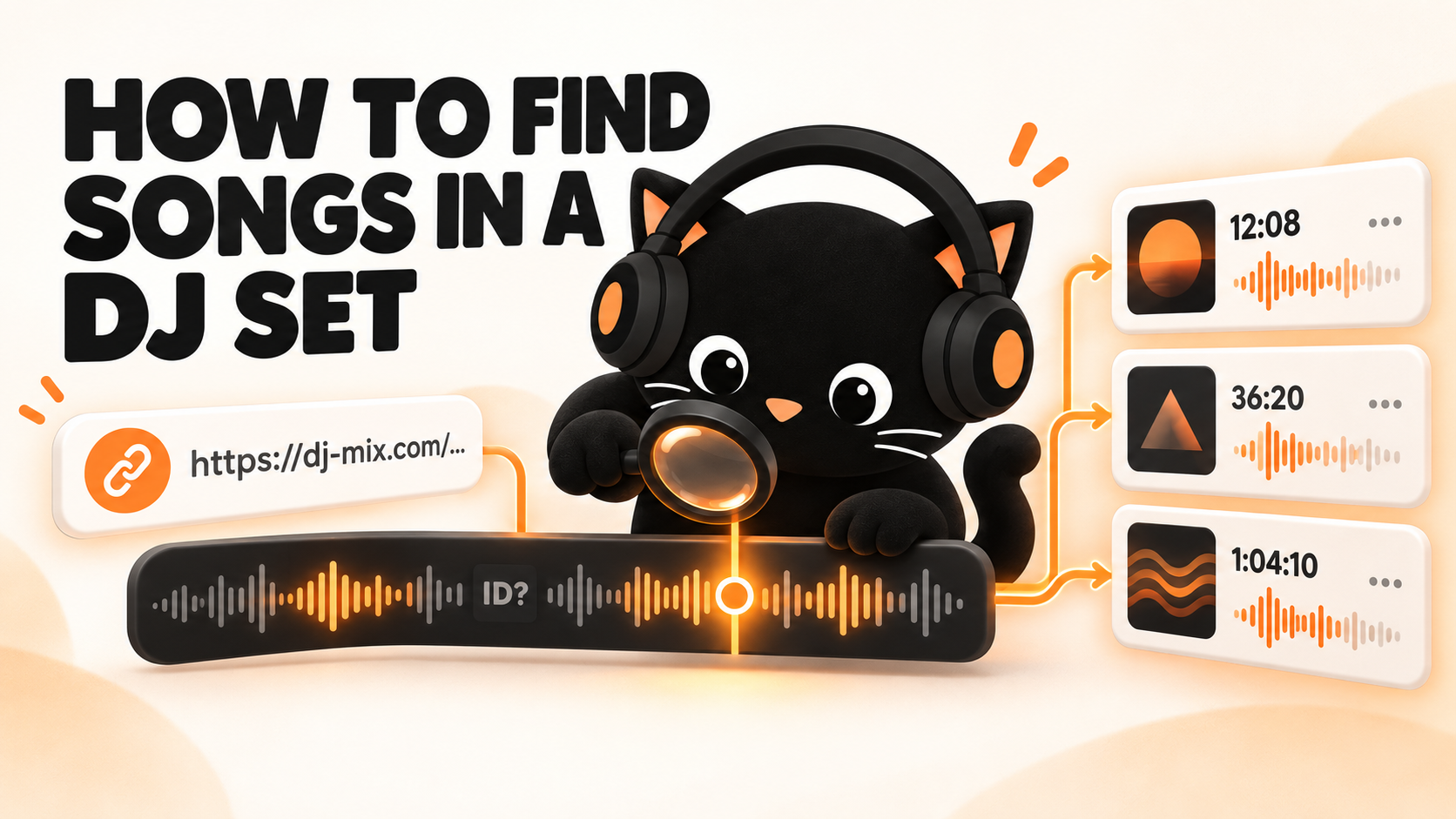
Forty-three minutes into a DJ set you found online, the DJ plays a track you instantly want to identify. You check the description. Nothing. You open the comments and find six people asking for the ID, but nobody seems to have an answer.
So, where do you go next?
That depends on what you have. A link to the full recording gives you one route. A single track playing clearly gives you another. And if the DJ has pulled out an unreleased edit that only five people own, software may not be the answer at all.
Here is the quickest way to choose:
What you have | Where to begin |
A link to the full DJ set | Analyze it through Setlist.id |
One clear track playing nearby | Try Shazam |
A tracklist in the description | Match the names with the timestamps |
An unidentified part of a recorded set | Check the comments or ask using the exact time |
A private edit or unreleased track | Follow the DJ or producer and check again later |
The first option will solve the biggest part of the job. So, let us begin there.
Find the Full Tracklist Using Setlist.id
Got the link to the recording? You do not need to sit through the entire set and identify every song separately.
Setlist.id analyzes the complete recording and returns the tracks it recognizes in playing order. Each result includes the point where the song appears, so the track you wanted at 43 minutes does not disappear inside a long list of titles.
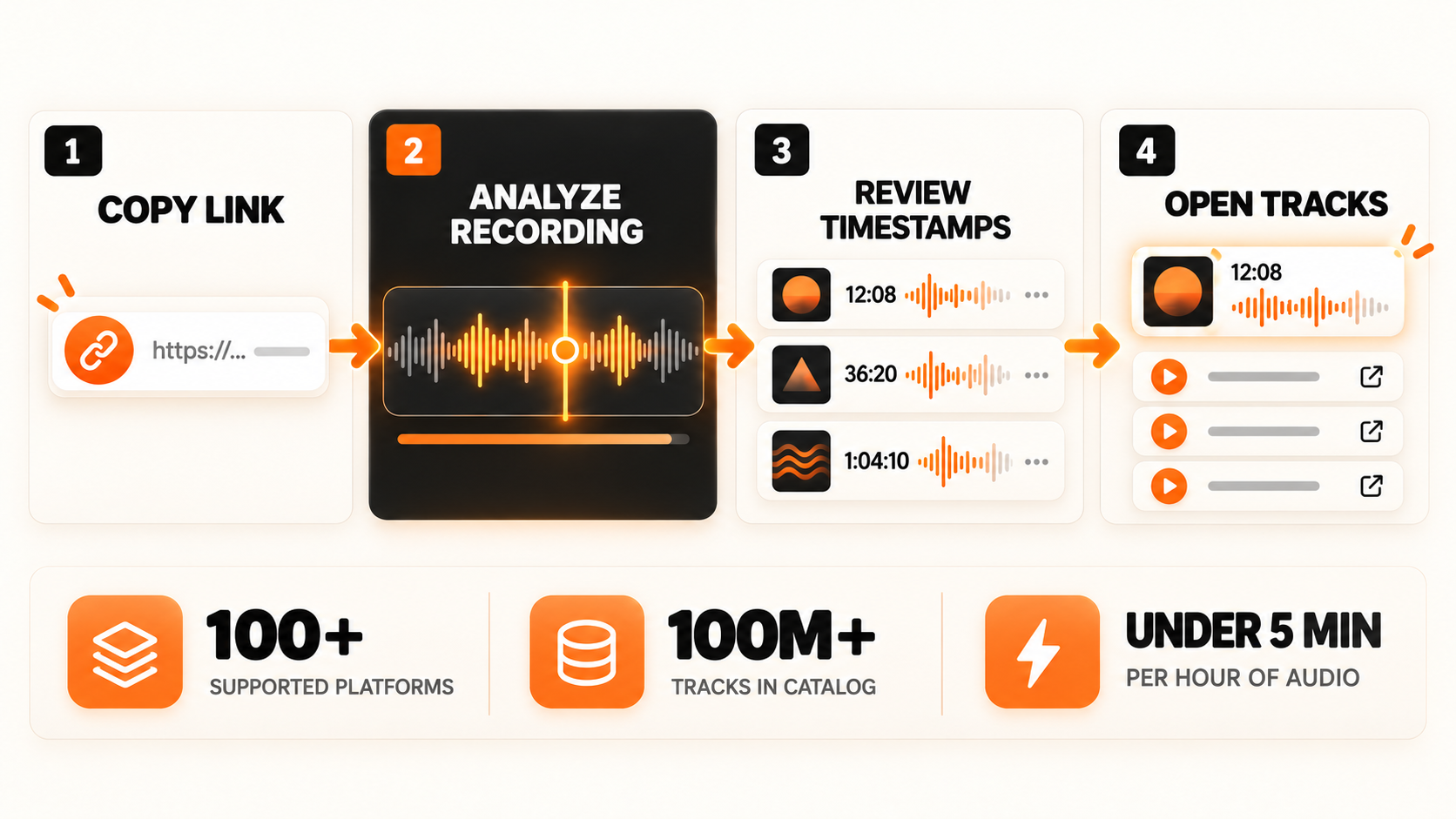
Copy the Link to the Recording
Open the DJ set and copy its URL. Setlist.id supports YouTube, SoundCloud, Mixcloud, Instagram, TikTok, Vimeo, Facebook, Hearthis, Audiomack, Bandcamp, X, and more than 100 other platforms.
Paste that link into Setlist.id and confirm the recording. There is no need to cut a short clip or find the cleanest part yourself. The full mix is processed from beginning to end.
The link, however, must be accessible. A deleted, private, expired, or restricted upload cannot be read. An unlisted YouTube video can work because anyone holding the URL can open it.
Got a recording that exists only on your phone or computer? Upload it to a supported platform first, then paste the new link into Setlist.id.
Let Setlist.id Scan the Complete Mix
A DJ set is rarely a clean row of separate songs. The outro of one record may still be playing when the vocals of the next one arrive. Another track enters through a filter, loops for several bars, or plays at a different speed.
Setlist.id divides the recording into overlapping sections and compares their audio fingerprints with its recognition catalog. The matches are then placed in timestamp order.
Here is what Setlist.id can handle as of September 2026:
Setlist.id coverage | Current figure |
Supported platforms | 100+ |
Indexed tracks | 100 million+ |
Typical processing time | Under 5 minutes per hour |
Read the Results in Playing Order
The finished analysis gives you more than a row of song titles. Each recognized track can include:
Artist and track name
Its timestamp inside the set
BPM and musical key
Cover artwork
Listening and purchase links
Export options for text and YouTube chapters
Select a track and return to the relevant part of the recording. You can then confirm that it is the song you wanted, open it on your preferred music platform, or save the information for later.
Setlist.id also shows where an unidentified passage appears. That gap tells you exactly where to check the comments or who to ask for help.
Use Shazam for One Clear Track
Shazam still has a useful place here. It simply handles a different job.
If one released track is playing clearly and you only want its name, open Shazam and let it listen. That may be quicker than processing the complete set. It works especially well when the song is playing on its own and the recording is close to the original release.
But a DJ transition can create a very different situation. Shazam may hear the drums from one track, vocals from another, room noise, and a pitch change at the same time. One short listen may return the wrong song or nothing at all.
Shazam has a better chance when | Shazam may struggle when |
One track is playing clearly | Two tracks are overlapping |
The song has been released | The track is unreleased |
The recording is clean | Crowd noise covers the music |
The tempo remains close to the original | The DJ changes the pitch heavily |
You need one song name | You need the full tracklist |
Shazam identifies the music playing around you, one attempt at a time. It does not process a two-hour recording and arrange every result beside its original timestamp. Nobody wants to sit beside the speakers and repeat the same scan thirty times.
So, use Shazam when a clear song catches your attention. Setlist.id uses its proprietary recognition algorithm to scan the full recording and identify tracks that Shazam may not recognize.
Check What the Uploader Has Already Shared
Setlist.id and Shazam work from the audio. But sometimes the answer is sitting a few centimeters below the play button.
DJs, radio stations, promoters, and listeners often add track information after uploading a set. One platform may carry the recording, while another holds the useful comments. So, spend a minute checking the original upload before calling the track impossible to find.
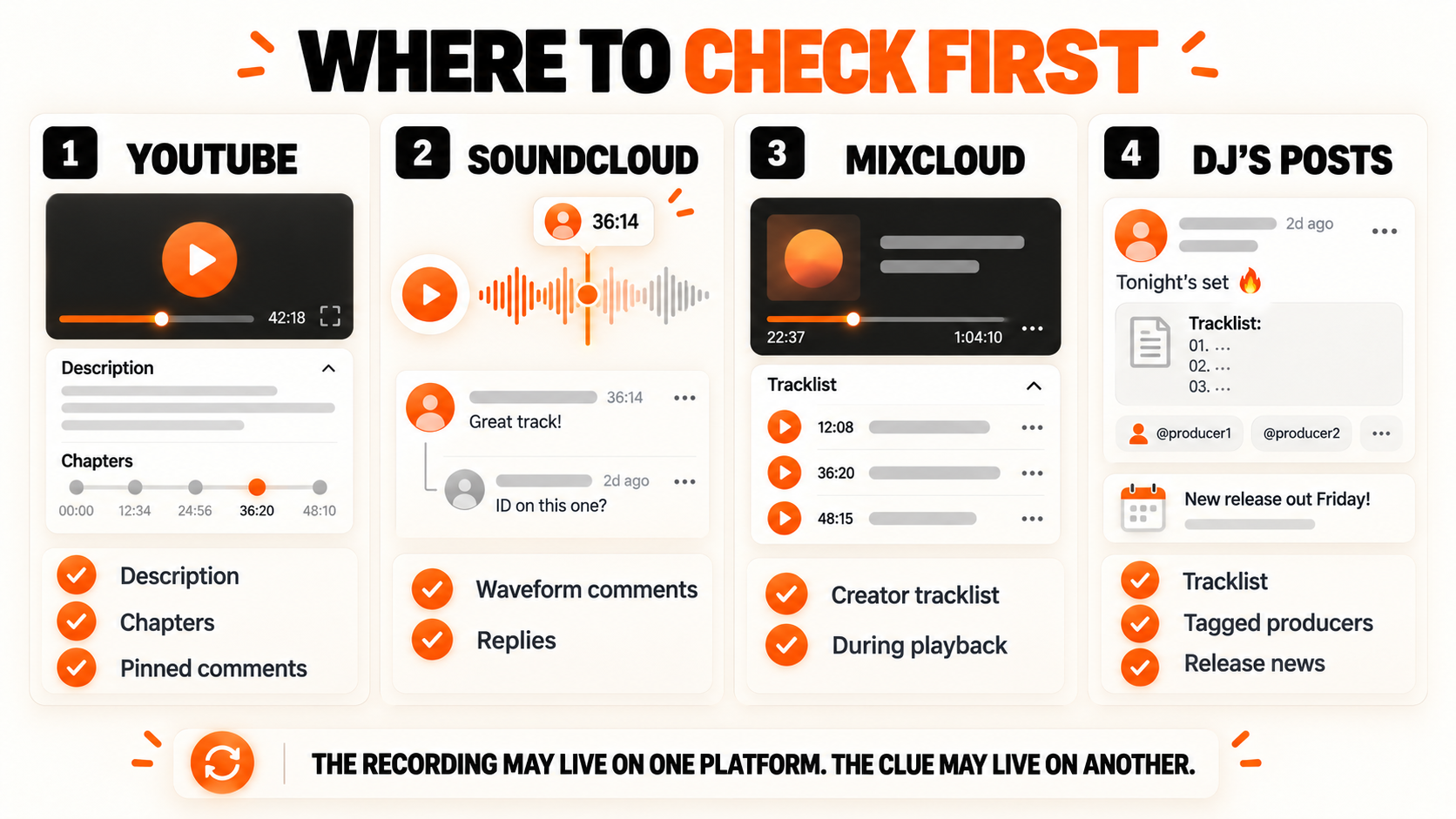
Start With the Description and Chapters
Open the complete description first. YouTube hides longer text behind “Show more,” which means a full tracklist can remain out of sight until you expand it.
A useful description may contain:
A numbered list in playing order
Track names paired with timestamps
Links to a Spotify or Apple Music playlist
Credits for unreleased tracks
Label names or planned release dates
Also check the video timeline. YouTube chapters divide a long video into named sections, and some uploaders use one chapter for each track. The name you need may appear directly above the progress bar. YouTube’s chapter guidance confirms that creators can create chapters using timestamped titles in the description.
SoundCloud works differently. Comments can be attached to an exact second on the waveform. That “ID please?” at 36:14 may already have a reply from the record's owner. SoundCloud confirms that comments and replies can be connected to precise timestamps.
Mixcloud creators can enter the artist, track title, and starting time when uploading a show. However, the names may appear gradually as you listen. So, an apparently empty tracklist can begin filling up once the show starts playing.
Read the Replies, Not Just Comments
A comment asking for an ID indicates that someone else noticed the track. The answer may arrive days later and sit underneath the original question.
Search the comments for:
The timestamp you need
“Track ID”
“Tune ID”
A lyric or vocal phrase
“Unreleased”
“Edit” or “remix”
Pinned and top comments deserve attention because listeners often collect several IDs into one long timestamped list. However, check newer comments too. A track unknown on upload day may receive a title after its official release.
Check the DJ’s Posts About the Set
The original upload is not always the only source. A DJ may share the recording on YouTube but post the tracklist on Instagram. A radio station may keep the audio on Mixcloud and publish the credits on its own episode page.
Search the DJ, event, and set title together. Then check posts published around the performance date. You are looking for an official tracklist, a tagged producer, a release announcement, or a reply from the DJ.
Another upload of the same recording can also help. SoundCloud may carry timed comments that the YouTube version lacks. Meanwhile, the YouTube description may include chapters that are missing from the SoundCloud page.
Try Human Help When Software Misses
Software can compare audio against millions of reference tracks. People can recognize a white label they bought ten years ago, an unreleased tune heard in another set, or a private edit shared inside a small scene.
That is where human identification earns its place.
Ask the DJ at the Right Time
A polite question can solve the mystery quickly. Ask under the original upload or reply to a post about the set. If you attended the event, wait until the DJ has finished. Nobody wants to answer a track question while cueing the next record in a loud booth.
Keep the request short:
Loved the set. Could you share the track playing at 42:18?
Some DJs will answer. Others may stay quiet because the track is unreleased, belongs to another producer, or forms part of their current set identity. No reply does not automatically mean the question was ignored.
Give People Enough Detail to Answer
“Anyone know this tune?” gives other listeners very little to work with.
A useful ID request includes:
The original recording link
The exact timestamp
The DJ and event name
The year or performance date
Any clear lyric you can hear
The result you already tried
Here is a stronger request:
Can anyone identify the track at 42:18 in Maya Jane Coles’ set from the Beatport Stage at Movement Detroit 2015? The vocal repeats “take me back.” Setlist.id marked that section as unidentified, so I’ve linked the full recording below.
The person reading it can jump straight to the music and answer in one reply.
Use Genre Communities for Difficult IDs
General music groups may recognize popular releases. Niche communities become more useful when the track comes from a specific corner of house, techno, drum and bass, trance, garage, or another scene.
Post in a community that matches the sound or the DJ. Keep the original set link attached. A recording hosted on its original platform carries more context than an isolated ten-second clip.
Also mention what you already know. If Setlist.id identified the tracks immediately before and after the gap, include those names. They help listeners locate the correct part of the set, even if they do not identify the missing record themselves.
Improve the Chances of a Match
The source you choose can affect the result. A clean festival upload and a phone recording made beside a shouting crowd do not carry the same audio detail.
Better choice | Why it helps |
Use the original upload | Reposted videos may have extra compression or altered audio |
Choose the clearest available recording | Cleaner music gives recognition tools more usable information |
Analyze the complete set through Setlist.id | The system can check the full recording in overlapping sections |
Use Shazam during a clear passage | One song playing alone gives it a cleaner sample |
Keep the exact timestamp | Comments, DJs, and communities can open the correct moment |
Try another official upload | It may contain better audio or a published tracklist |
Do not convert a poor recording into WAV and expect the missing detail to return. Changing the file extension cannot restore audio that was lost during recording or compression.
The order matters too. Analyze the full set first. Then check the information already attached to it. Human help comes next for the remaining gaps. That approach gives you the broadest tracklist while keeping the manual work limited to what the music software could not name.
Understand Why Certain Tracks Stay Unidentified
You can use the clearest recording, scan the complete set, and still end up with a few empty spaces. That does not always point to bad software or a bad source. Some music simply cannot be matched yet.
Some Music Has No Public Reference
Recognition begins with comparison. The system hears part of the recording and searches for the same audio fingerprint inside its catalog.
An unreleased track has no public recording to compare. The same problem appears with:
Private DJ edits
Producer demos
Dubplates
Unreleased remixes
One-off festival versions
Bootlegs that never received an official release
A DJ or producer may still name the track in a comment or social post. But audio recognition cannot pull a title from a recording that has never entered its reference catalog.
Several Tracks May Be Playing Together
DJs do not always wait for one song to finish before starting the next. A long blend may contain the kick and bass from one record, the vocal from another, and an extra loop placed over both.
Recognition could return:
Both tracks
Only the most audible track
The original song behind an edit
No reliable match
Mashups create a similar problem. The instrumental may come from one release while the vocal belongs to another. A result naming only one part is not necessarily wrong. It may be the only recording the system could separate clearly enough to recognize.
Audio Changes Can Hide the Match
A DJ can speed up a track, pitch it down, loop a short phrase, cut the bass, or run the music through effects. Moderate changes may still leave enough information for recognition. Heavier changes can move the recording too far from its stored fingerprint.
The source matters too. A direct festival stream usually carries more detail than a phone video recorded beside the speakers. Crowd noise, clipping, room echo, and repeated compression can bury the useful parts of the music.
Here is the practical response to each problem:
Why the track stayed unknown | What you can do next |
It may be unreleased | Check the DJ or producer’s posts later |
It sounds like a private edit | Ask the DJ using the timestamp |
Two records are overlapping | Check whether one part was identified |
The source has poor audio | Try another official upload |
The track is heavily altered | Look for comments naming the edit or remix |
No explanation is clear | Save the link and check again after release |
An unknown track is not always the end of the search. Sometimes it is simply early.
Find Songs Across Different Mix Platforms
The basic goal stays the same across every platform: locate the best available recording, check the information already attached to it, and analyze the full link when the tracklist is incomplete.
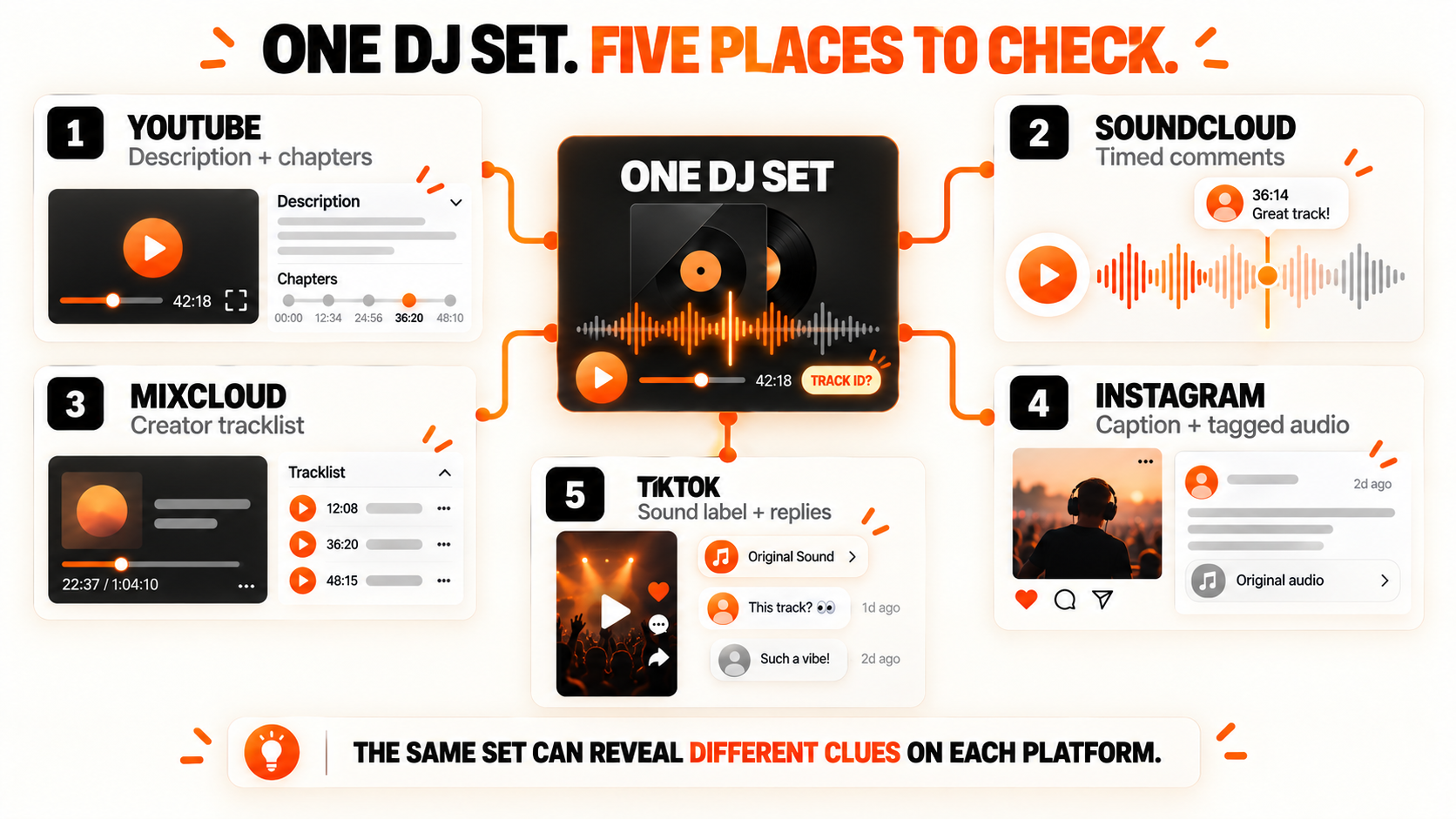
But each platform hides useful details in a different place.
Platform | Where useful clues appear | Best next action |
YouTube | Description, chapters, pinned comments, and replies | Paste the video or livestream replay into Setlist.id |
SoundCloud | Description and timed waveform comments | Paste the public mix link and compare its timestamps |
Mixcloud | Creator tracklist revealed during playback | Analyze the show link if names are missing |
Caption, tagged audio, comments, and live replays | Paste the public Reel, post, or saved live link | |
TikTok | Sound label, caption, comments, and creator replies | Paste the public video link |
Hearthis | Description, comments, and creator profile | Analyze the mix URL |
Vimeo | Description, credits, and linked event pages | Paste the public video link |
Video caption, comments, event page, and livestream replay | Use the accessible public video URL | |
Audiomack | Description, creator details, and comments | Paste the public mix or mixtape link |
A set may exist on several of these platforms. That is useful. The YouTube upload might contain the cleanest video, the SoundCloud version may include timed comments, and the Mixcloud page may display a creator-supplied tracklist during playback.
So, if one upload gives you nothing, search for the same DJ, event, and date elsewhere. You are not searching for the song manually. You are looking for another copy of the set with better audio or more information.
Turn One DJ Set Into New Music
Finding music inside a DJ set does not need to begin with an hour of replaying transitions. Start with what you have.
A full recording link belongs in Setlist.id. One clean song can be checked through Shazam. Descriptions, chapters, timed comments, and creator tracklists may already contain the answer. Human help comes in when the music is unreleased, heavily edited, or known only inside a smaller scene.
The result may be a complete tracklist or a list with a few stubborn gaps. Either way, you now know what played, when it appeared, and where the remaining search should begin.
Found a set packed with tracks you want? Paste the link into Setlist.id and see which ones come back.